Review Comments (3) Screenshots (3) Questions & Answers (0) Votes (4) Awards (10) Wiki  
(4)
Bulk Rename Utility
2.7.1.2
www.bulkrenameutility.co.uk
Freeware
1 372 people
Download Bulk Rename Utility

963.9 KBDownloaded 3707 times

This software was checked for viruses Last month and was found to contain no viruses.
Click here to see antivirus report.
 

Review

Bulk Rename Utility is a freeware tool, useful to rename numerous files and folders at the same time, according to different criteria, and adapting to the needs of each user.

In spite of its apparently sophisticated interface, this tool is extremely simple to use. The controls to rename files are organized into boxes, grouped according to their functions. Once you have selected the files to rename, you can choose any or some of the boxes to perform the changes. Take into account that not all of them need to be filled to complete a process. You can select only the ones of your interest. As you change the name of a file or group of files, this new name will be shown in the list so that you can see how it'll look like when finished and to make desired corrections.

With Bulk Rename Utility you can, for example, change the filename to upper case, lower case, tile case, autonumber files, add a prefix or suffix, remove certain characters or symbols in a filename, and many other options that are worth discovering. It supports renaming mp3 files using ID3 Tags, as well as photographs using EXIF meta data.

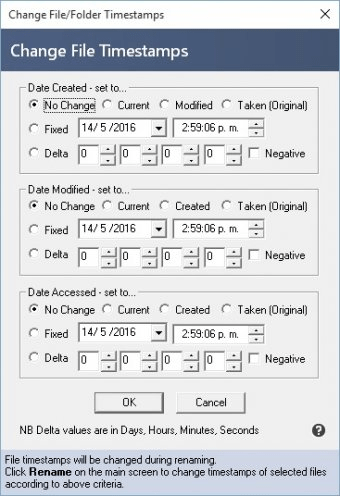
Some extra features of Bulk Rename utility include: change file attributes and timestamp on renamed files, renaming from a text file, regular expressions processing, custom date formats, and others. Bulk Rename Utility is freeware, stable, and light-weighted. In a word, excellent.
  • It can process a number of files at an incredible speed.
  • Lots of options of file and folder renaming.
  • Very easy to use.
  • Freeware.
  • Not found.

Reviewed by: Mariel Rearte

Reviewer rating:

Reviewed: 2 years ago

Report a wrong version Report a wrong program title Suggest a correction

Screenshots

Main Screen Main Screen Renaming Files Renaming Files BRU Options BRU Options

Latest comments

John(beginner) 2 years ago 
Well the document warns you that the main page is overwhelming, but I wanted to rename jpegs with the date and time taken as the prefix so that I could merge pictures taken with two cameras and keep the order correct. It worked like a charm. Had to guess that %Y gave me a 4 digit year and that the Custom box would accept a format string. Also had to guess which menu to use to extract EXIF date. The PDF file which I read later would have answered most of my questions. All in all a very useful program.
Reply
IndigoDragon(beginner) 2 years ago 
I have to agree with "Henry"...
this program makes my "personal library" much more manageable and easier to clean up the labes/names in it with but a click of a couple of buttons!
and FREE to boot!
And since i get most of my stuff through TorrentOOgle[dot]com it makes it soOO much nicer!
Reply
Henry Menson(beginner) 3 years ago 
FREE Outstanding. Immensely convenient for me to be able to rename any/all files in a folder. Very clever. I guess I'm mentally lazy so I don't try to do all things to a file(s) that can be simultaneously done. I often make changes to file groups one at a time.
Reply
Add new comment All 3 comments

E-mail Address:

Password:

Register now »

Forgot password?

Sign in with:
.bru Bulk Rename Utility
Download Software Informer Client
Copyright © 2012, Informer Technologies, Inc. About| Privacy and terms| Help| Feedback & Support| Partners program